


Getting Back to the Boat
What 700 Rip readers told us about their devices, email, and navigation
By Jim Reynolds | www.reynolds.com
November 5, 2026
Ahoy, mateys!
Sometimes, more is less and less is more.
It is “settled science” (to use a term from our friends on the Left) that when all I give you is an author, a title, and a link you will click at a vastly higher rate than if I give you more information.
At the same time, others tell me — emphatically — that the summaries and discussions enable them to learn the key points of an article quickly and then move on. If “grokking” the essence of an article is the main point, then all the extra analysis is doing its job.
However, in both cases we need to make sure you are not being tossed overboard when you travel elsewhere to an article’s internet destination. Or, put more plainly, when you click a link.
But first, let’s talk about the results of our little survey.
What kind of computer/phone/tablet are you using?
Over 700 of you responded, which gives us a good statistical base to start with.
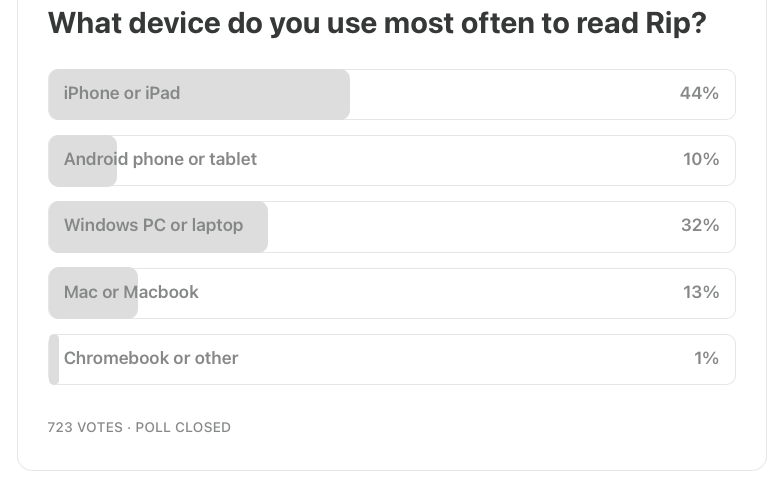
So we have 57% on Apple products, either iOS (iPad and iPhone) or Mac OS. About 1/3 of you are on Windows PCs or laptops. The other 11% are on Android (phones, I am guessing) or other.
This information greatly simplifies how I may end up walking you through various navigational scenarios. I may discover that most of you have already figured this out. I just want to make sure I am not leaving anybody behind.
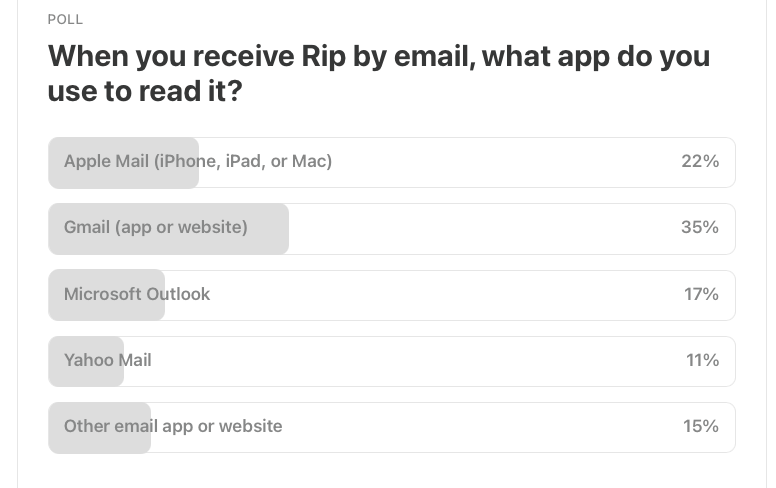
Here we see that the most popular email app is Gmail. I could already somewhat determine this by the types of addresses in your emails. Apple Mail and Outlook are also well represented. I happen to use all three of these systems, which, together, cover 3/4 of all systems used by our subscribers.
In my explorations of the various email systems, I have found that they mostly follow similar procedures when navigating from email to web and back.
The main areas of confusion are likely on the phone itself, due to the compressed presentation afforded its users. If I need to explain any of that then I will.
So let’s get down to it. Let’s find out if any of you need any more instruction on how to click on articles and get back to the email app.
Here is our live survey. Please respond.
The Freedom to Explore
Here’s what I’d really like.
I want you to feel completely comfortable reading Rip however you choose.
Read the summary and move along. Read the discussion and think about the argument. Or click through and enjoy the entire original article.
Then come right back and see what else we’ve caught.
No worries about getting lost. No mysterious buttons. No need to send out the Coast Guard.
The goal isn’t to make you click more. It’s to make sure you can read Rip exactly the way you prefer.
And remember: The whole point of leaving the boat is knowing you can get back aboard.
Last time we got over 50 comments and I read and responded to every one of them.
If you would like to leave a comment, please use the button below.
— Jim
I am 94 years old and have no problems with my PC. I do not like to use a Smartphone simply because of the tiny keyboard involved so use my PC for everything even though I now am forced to use my Smartphone for logging in with two tier passwords and other massive inconveniences produced by the cell phone industry. The Smartphone has made today's population stupid.
I'm not quite as old as William but I feel that I'm a better informed citizen after reading Rip's newsletter for several years and appreciate your taking up the mantle. Conner